
Install PhotoPWA and use the editor offline
PhotoPWA can be installed as a web app in browsers that offer website installation. You still use the same photo editor; installation adds a shortcut and can open it in its own window.
Install from your browser
- Open PhotoPWA online and try opening the editor.
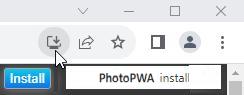
- Look for an installation option in the address bar or browser menu. It may be called “Install app” or “Add to Home Screen”. The wording and availability depend on your browser and device.
- If PhotoPWA shows its own Install button, you can use that button to open the browser's installation prompt.
- Complete the browser's prompt, then launch PhotoPWA from the new shortcut.
What can work offline?
The service worker stores application resources in the browser cache. Previously loaded resources can be available without a connection. Open the editor online before relying on it offline, so its editing scripts have been downloaded.
A resource that has not been cached still needs the internet. The new tutorial pages are separate documents; do not assume every guide is available offline after visiting only the home page. Importing an image from another website and sending a contact message also require a connection.
Keep your image files
Save edited results to your device and keep the originals. The app cache is for application resources, not a permanent backup of your photo collection. Clearing browser site data can remove cached resources and preferences.
Opening a file with the installed app
Some supported browsers and operating systems can offer PhotoPWA as an application for opening image files or receiving a shared image. These integrations depend on the device and browser. If they are unavailable, open PhotoPWA and select the file in the editor.
If installation is not offered
You can continue to use the website without installing it. Try the browser's menu rather than assuming the site must show an Install button. If the app is already installed, another installation prompt may not appear.
Open the photo editor or start with the crop guide.